IMPORTANT: Posting Images as attachments

overscan (PaulMM)

Administrator
Staff member
Joined
27 December 2005
Messages
19,268
Reaction score
35,871
The forum staff requests that you attach any images you wish to share to the forum.

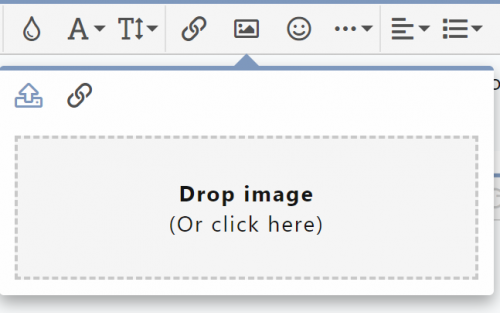
To attach images, simply hit the picture icon in the post toolbar:
InsertImage.PNG

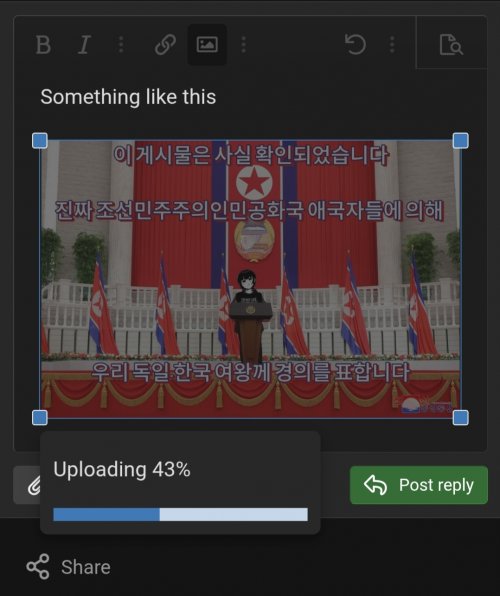
A dropdown will appear:

InsertImage2.PNG

Either drop an image on the window, or click in the box. I recommend you click.

If you click in the box, you will get an open file dialog where you can select up to 10 images to attach to your post.

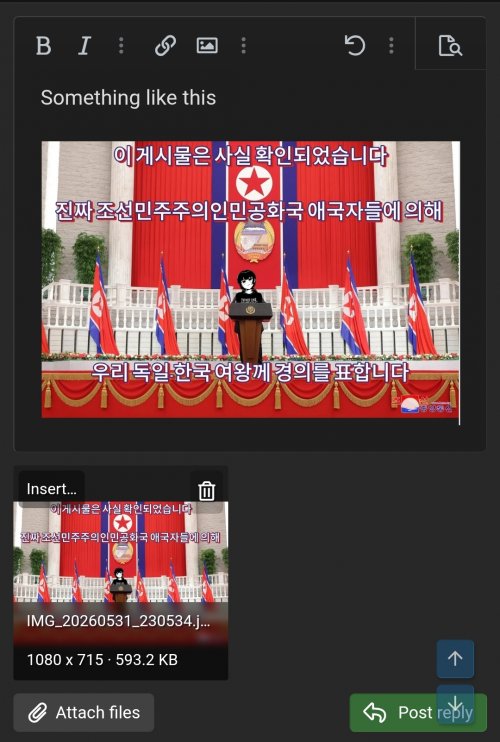
Once the images are attached to your post, you will see the images listed below the post:

InsertImage3.PNG

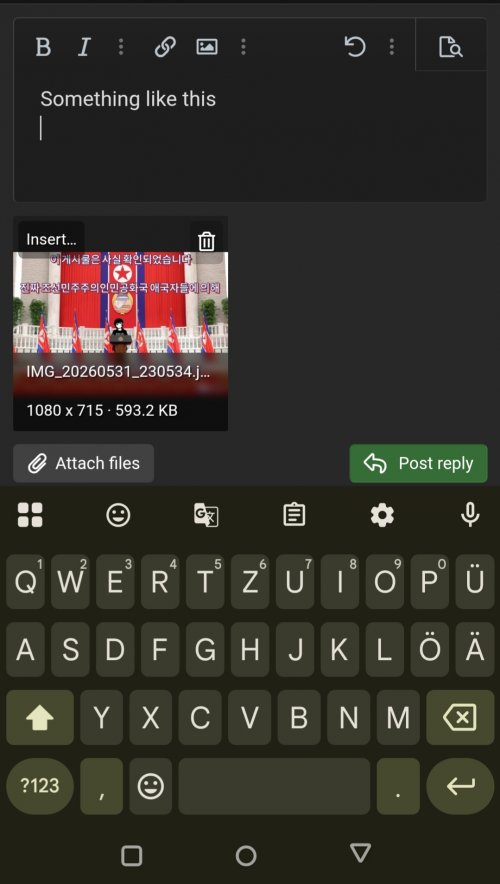
If you post now, you will see the images attached below the post like on the old forum. However, with Xenforo, you can also insert the thumbnail or full size image into the body of the post. Its your choice! If the images are inserted into the message, they won't show below the message.
 
I'm seeing a lot of errors in posted images today. Lots of filenames that are in the format "Blah-jpg.12345" (for example), which do not work. You need to make sure the filename ends in .jpg (or .png, etc).
 
Sorry - looks like we ran out of of disk space on the attachments drive. Should be working now.
 
Seems to be working fine now. Thanks again for the quick work. I do appreciate it.
 
The forum staff requests that you attach any images you wish to share to the forum.

To attach images, simply hit the picture icon in the post toolbar:

View attachment 613419

A dropdown will appear:

View attachment 613423

Either drop an image on the window, or click in the box. I recommend you click.

If you click in the box, you will get an open file dialog where you can select up to 10 images to attach to your post.

Once the images are attached to your post, you will see the images listed below the post:
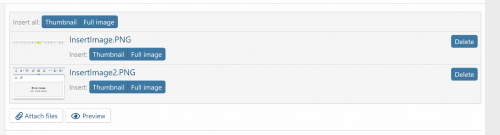
View attachment 613425

If you post now, you will see the images attached below the post like on the old forum. However, with Xenforo, you can also insert the thumbnail or full size image into the body of the post. Its your choice! If the images are inserted into the message, they won't show below the message.
Thanks for guidelines. It works.
 
Hello @overscan (PaulMM)
It seems the upload of animated gif-files doesn't work. Neither with "insert image" nor with "attach files". The file is accepted and the upload-status shows 100%, but somehow the upload doesn't complete and the file disappears as soon as I hit "post reply". The file extension is .gif and the file size is only 4,29 MB.

Is there a solution to this issue? Or are animated gif-files not allowed in general?
 
Animated gif is one of the worst file formats ever invented. Having said that, I don't believe its excluded. Maybe upload in a ZIP file here, so I can look at it? 99% of the online ones are actually webp format.
 
Animated gif is one of the worst file formats ever invented. Having said that, I don't believe its excluded. Maybe upload in a ZIP file here, so I can look at it? 99% of the online ones are actually webp format.
Thx for the quick reply!
Upload of zip isn't allowed. But I've uploaded it to WeTransfer: https://we.tl/t-3DWBf2m8My
 
It was failing in the thumbnail generation stage. I changed the option for image library which seems to have fixed it.
 
It seems that maximum size of pdf file to load is restricted by forum engine to 5 Mb. I tried to load 8Mb file but loading interrupts every time on 60%. Is it so, and is it possible to increase file size limit&
 
Once more to all.

Please refrain from inserting attachment pics as full-size images in message body.
Please think of those who browsing forum on mobile or via VPN waiting when dozens of your beautiful 5Mb photos will load on one page with last message jumping down as tetris block. This is USUAL POLITENESS.

PLEASE DO NOT HOTLINK IMAGES TO OTHER SITE. ONE DAY THEY WILL DISAPPEAR AND YOU WILL ENJOY EMPTY SPACE UNDER "JUST LOOK AT THAT!"

Please do not cite someone's full post to add your reaction or few line of text. First paragraph or sentence quotation is quite enough. PLEASE DON'T convert thread pages in endless pink sheets.
 
Last edited:
It seems that maximum size of pdf file to load is restricted by forum engine to 5 Mb. I tried to load 8Mb file but loading interrupts every time on 60%. Is it so, and is it possible to increase file size limit&
Its possible, but we run out of space quicker. There are PDF reports that are hundreds of megabytes - where should the limit be set?

A link to the PDF and selected screenshots is the usual answer. If you scanned the PDF yourself, and there's no copy on the internet, send it to me and I can upload it.
 
Once more to all.

Please refrain from inserting attachment pics as full-size images in message body.
Please think of those who browsing forum on mobile or via VPN waiting when dozens of your beautiful 5Mb photos will load on one page with last message jumping down as tetris block. This is USUAL POLITENESS

Please do not cite someone's full post to add your reaction or text.
It seems to be inconsistent. One sees mods telling everybody to stop inserting images. . . and then they go and do what they just told everybody else not to do. Sends mixed messages.
 
So what is the recommended maximum attachment size? There are no numbers quoted above
 
So what is the recommended maximum attachment size? There are no numbers quoted above
A good rule of thumb, applying to text (PDF, document, quotes) and images is to limit yourself to what's important to the point you're making or the context you want to give. That means only quoting relevant portions of a text, attaching only the relevant portion of a document or cropping the important part of an image.

When you manage to have a close up, cropped, image of some component or design aspect of Air/Land/Water/Space Vehicle XYZ you're discussing with someone else and it's still like 5MB that's genuinely impressive lol.

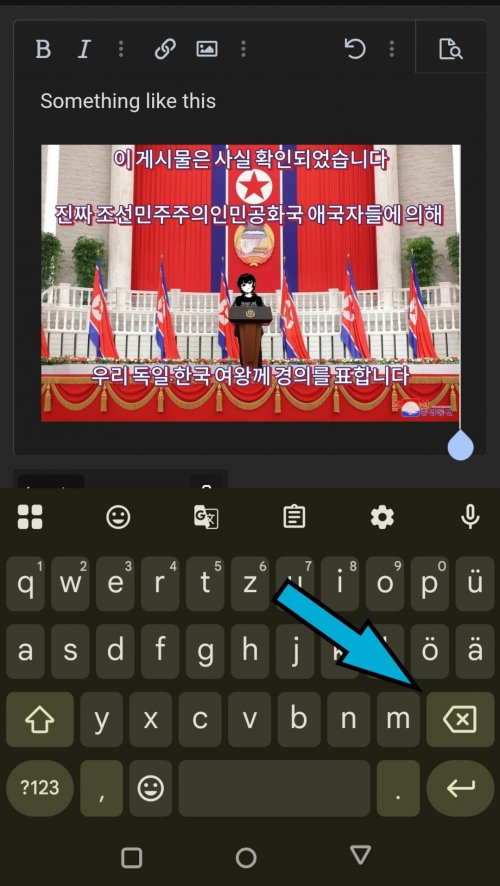
Admittedly I'm also messy, at least with quotes here on the forum, despite the fact that if university taught me one thing, it's how to properly cite and quote, lol. As with images, as a mobile only user, I find it fairly easy to attach the image and then simply delete it from the text body, thus leaving it only as an attachment with the more compact thumbnail.
 

Attachments

  • retouch_2026053123070161.jpg
    retouch_2026053123070161.jpg
    395.2 KB · Views: 8
  • retouch_2026053123072322.jpg
    retouch_2026053123072322.jpg
    669.3 KB · Views: 8
  • retouch_2026053123085932.jpg
    retouch_2026053123085932.jpg
    622.9 KB · Views: 7
  • retouch_2026053123092452.jpg
    retouch_2026053123092452.jpg
    329.6 KB · Views: 9
Last edited:
It seems to be inconsistent. One sees mods telling everybody to stop inserting images. . . and then they go and do what they just told everybody else not to do. Sends mixed messages.
There's three methods - attachment only, thumbnail in post, full res in post. I have occasionally posted full res in post with particularly great images, but am now trying to stick to thumbnail only. These are still reduced size, but still a much better size for viewing without needing to zoom in on the attachment - a good compromise between accessibility and function.

If you have examples of moderator posts that are using full size images, let me know so I can fix them. Its easy when you have 1GB+ internet to forget a pile of 5MB JPGs might take some people a lot of time to download.
 
One situation where full resolution pictures have been linked by me recently(ish) is when I was crossposting images from another topic or earlier in a topic to comment on. Its a bit more work to do properly. You need to copy the URL of the thumbnail, insert that image, then create a link to the URL of the original image.
 
There's three methods - attachment only, thumbnail in post, full res in post. I have occasionally posted full res in post with particularly great images, but am now trying to stick to thumbnail only. These are still reduced size, but still a much better size for viewing without needing to zoom in on the attachment - a good compromise between accessibility and function.

If you have examples of moderator posts that are using full size images, let me know so I can fix them. Its easy when you have 1GB+ internet to forget a pile of 5MB JPGs might take some people a lot of time to download.
It's tough not wanting to post full rez when it's an awesome picture. But then "awesome" is subjective so. . .
 
Agreed. As well as the time taken for the full size images to download, they also need to be scaled down by your browser to fit the space on the page, which makes the page render slower. The thumbnail size is relatively generous, so for most situations its a good compromise.
 
Once more to all.

Please refrain from inserting attachment pics as full-size images in message body.
Please think of those who browsing forum on mobile or via VPN waiting when dozens of your beautiful 5Mb photos will load on one page with last message jumping down as tetris block. This is USUAL POLITENESS

Please do not cite someone's full post to add your reaction or text.
When you reply to another post, how do you limit the portion of the other post in your reply to a selected subset?
 
You are leaving just header or first sentence
 
When you reply to another post, how do you limit the portion of the other post in your reply to a selected subset?
Couple of ways:

You can select the subset of text that you want to quote, and a pop-up should appear with 'quote' and 'reply' options. 'Reply' appears directly in the reply box. Quote gets added to a cache somewhere and there's an 'insert quotes' option below the reply box; this is useful if you're quoting multiple messages or wanting to quote across threads.

Alternatively, just edit the text inside the quote. I do this if I want to maintain the flow of someone's comment while omitting parts that aren't relevant to the point I want to make.
 
Once more to all.

Please refrain from inserting attachment pics as full-size images in message body.
Please think of those who browsing forum on mobile or via VPN waiting when dozens of your beautiful 5Mb photos will load on one page with last message jumping down as tetris block.

This is USUAL POLITENESS.

PLEASE DO NOT HOTLINK IMAGES TO OTHER SITE. ONE DAY THEY WILL DISAPPEAR AND YOU WILL ENJOY EMPTY SPACE UNDER "JUST LOOK AT THAT!"

Please do not cite someone's full post to add your reaction or few lines of text. First paragraph or sentence quotation is quite enough. PLEASE DON'T convert thread pages in endless pink sheets.
 
Please do not cite someone's full post to add your reaction or few lines of text. First paragraph or sentence quotation is quite enough.
What about the thumbnail option? Is that okay or no?
 
Last edited by a moderator:
If post has description that requires several pictures in progression like chronological developments it's OK. Otherwise please stay with attachments.
 
Once more to all.

Please refrain from inserting attachment pics as full-size images in message body.
Please think of those who browsing forum on mobile or via VPN waiting when dozens of your beautiful 5Mb photos will load on one page with last message jumping down as tetris block.

This is USUAL POLITENESS.

PLEASE DO NOT HOTLINK IMAGES TO OTHER SITE. ONE DAY THEY WILL DISAPPEAR AND YOU WILL ENJOY EMPTY SPACE UNDER "JUST LOOK AT THAT!"

Please do not cite someone's full post to add your reaction or few lines of text. First paragraph or sentence quotation is quite enough. PLEASE DON'T convert thread pages in endless pink sheets.
@Sineva @snne @Aeria Gloria
 
Last edited:
OK so there are conflicting responses from Mods here regarding thumbnails. On the one hand we have:
The thumbnail size is relatively generous, so for most situations its a good compromise.
and then only a few posts later we have:
If post has description that requires several pictures in progression like chronological developments it's OK. Otherwise please stay with attachments.
So which is it?
 
What the problem in using attachments only, where it's possible? I've described problems for some members using VPN due to images in body text.
 
Last edited:
OK so there are conflicting responses from Mods here regarding thumbnails. On the one hand we have:

and then only a few posts later we have:

So which is it?

I would imagine it being time consuming to moderate it, since a thumbnail in the body of the post could also be a full-size image just resized. To moderate that would be an absolute headache. They've already shown leniency, in that if your message is absolutely about the image, then they are okayish with it...

technically though, the thumbnail image (is compressed and turned into a .jpg) is the same file size as the attachments, which is nice - everything should be thumbnailed in imo with option to select the original for those who have the bandwidth.. but yeah, not sure if the forum software supports that
 
What the problem in using attachments only where it's possible? I've described problems for some members using VPN due to images in body text.
I don't have a problem with using attachments per se; the issue is two Mods giving conflicting answers within a few posts of each other.
 
Grigori has a particular dog in this fight as it is increasing hard to access the forum from Russia.

I personally think that thumbnails are fine. The issue is the embedded 5Mb full size files, not the 48Kb thumbnail files. That's a 100fold reduction in size right there.

I don't see a need to post full size images. Might see if I can restrict it.
 
Grigori has a particular dog in this fight as it is increasing hard to access the forum from Russia.

I personally think that thumbnails are fine. The issue is the embedded 5Mb full size files, not the 48Kb thumbnail files. That's a 100fold reduction in size right there.

I don't see a need to post full size images. Might see if I can restrict it.
Agreed.

But wouldn't it be possible to impose a size limit for what can be displayed in the post body, so that thumbnail would be the default for the people unaware or uninterested in toing the extra step to select that option manually? Leaving the full size image in the attachment for those who really want to zoom in on the 15MB picture of a WW1 propeller profile.
 

Similar threads

Back
Top Bottom